

If you follow my author page on Facebook, then you know I have been asking people who enjoyed reading my book to put up a review on Amazon.com. I never stopped to think that maybe not everyone knows how to do this.
Sorry!
So here’s a quick tutorial:
- Find my book on Amazon.com

2. Scroll down to the Customer Review section
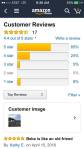
3. Click on ‘Write a Review”
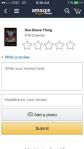
4. Click on the stars to rate it (Hint: 5 stars is good… 🙂 ) and then write whatever you want in the “Write Review Here” box. You can put a photo or a headline if you want, but it’s not necessary.
5. Hit SUBMIT!
That’s it. There is a short delay before your review goes live and others can see it, so don’t worry.
P.S. I found out that Amazon only considers 4 or 5 star ratings good. Any rating 1-3 is NOT considered good, so please remember this when you are composing a review.
THANK YOU!


You must be logged in to post a comment.